
Image Protection Measures in the Shop
Dynamic Watermarks
Brief Overview
Dynamic Watermarks add an extra layer of protection to the preview images displayed in your online galleries. When enabled, a dynamic overlay is applied alongside your existing watermark, making it more difficult for images to be cleaned using common watermark-removal tools.
Combined with your existing watermark, Dynamic Watermarks help better protect your studio's images while still allowing customers to preview them before ordering.
Overview & Objective
In this article, you'll learn how to enable and use Dynamic Watermarks in your Shopping Cart Template.
Dynamic Watermarks allow you to:
Add an additional layer of image protection.
Increase the difficulty of removing watermarks from preview images.
Choose from two dynamic overlay patterns.
Enhance your overall image protection strategy.
Workflow also includes desktop screenshot protection to help reduce unauthorized image captures.
Setup / Configuration
Dynamic Watermarks are configured within your Shopping Cart Template.
To access the setting:
Open Shop.
Select Manage Cart Templates.
Open the Shopping Cart Template you want to edit.
Select the Watermark tab.
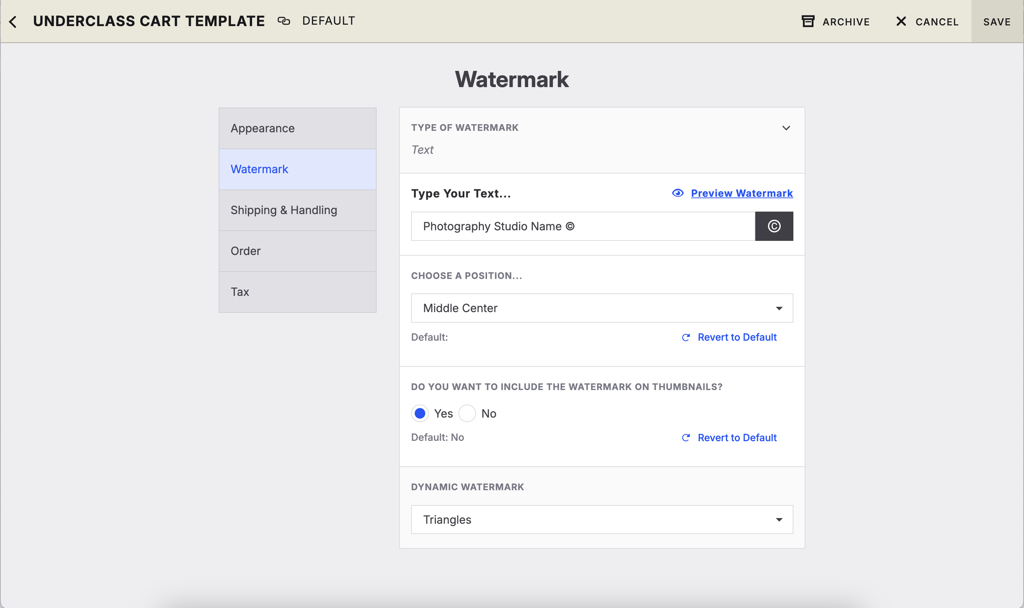
💡 PRO TIP: For the best protection, enable a Dynamic Watermark alongside your existing text or image watermark rather than using it as a replacement.
Available Dynamic Watermark Styles
Workflow currently offers two Dynamic Watermark patterns:
Pattern | Description |
|---|---|
Lines | Applies a repeating line pattern across the preview image to increase image protection. |
Triangles | Applies a geometric triangle pattern that adds additional visual complexity to preview images. |
Both options are designed to make watermark removal more difficult while allowing customers to preview images before placing an order.
Advanced Options / Additional Rules
Image Protection Best Practices
Dynamic Watermarks have been tested against widely available watermark-removal tools and provide an additional layer of protection for preview images.
Because image-removal technology continues to evolve, Dynamic Watermarks should be used as part of a broader image protection strategy.
For the best results, we recommend:
Using a Dynamic Watermark together with your existing text or image watermark.
Reviewing your watermark placement to maximize image coverage.
Keeping your Shopping Cart Template settings up to date as new protection features become available.
Desktop Screenshot Protection
Workflow also includes desktop screenshot protection to help reduce unauthorized image captures.
When the system detects actions commonly associated with taking a screenshot on a desktop device, shoppers are presented with a pop-up instead of the enlarged image.
The pop-up allows customers to:
Return to the gallery they were viewing.
Copy the gallery link to share with others.
This feature helps discourage screenshots of enlarged preview images while maintaining a smooth shopping experience.
Common Questions
Q: Does a Dynamic Watermark replace my existing watermark?
A: No. A Dynamic Watermark is designed to work alongside your existing text or image watermark, providing an additional layer of protection.
Q: Which Dynamic Watermark pattern should I choose?
A: Both Lines and Triangles are designed to improve image protection. Choose the pattern that best fits your studio's preferences.
Q: Will customers still be able to preview images?
A: Yes. Dynamic Watermarks are designed to protect preview images while still allowing customers to view them before placing an order.
Q: Does Workflow prevent screenshots?
A: Workflow includes desktop screenshot protection that detects actions commonly associated with taking screenshots of enlarged preview images. When detected, customers are shown a pop-up with options to return to the gallery or copy the gallery link.
Q: Are Dynamic Watermarks guaranteed to prevent watermark removal?
A: No. While Dynamic Watermarks are designed to make watermark removal significantly more difficult, image-removal technology is constantly evolving. They should be used as one part of a broader image protection strategy.