
Understanding Page Dimensions & Margins
Page dimensions (length, width) are automatically preset based on the book type. While your book will be trimmed to a standard size (eg. 8.5″×11″) the editor will display a slightly larger canvas.
When designing your pages in the editor, respect the margins around your page edges to ensure that no important content will be clipped and background elements will reach the edges of the pages with no gaps.
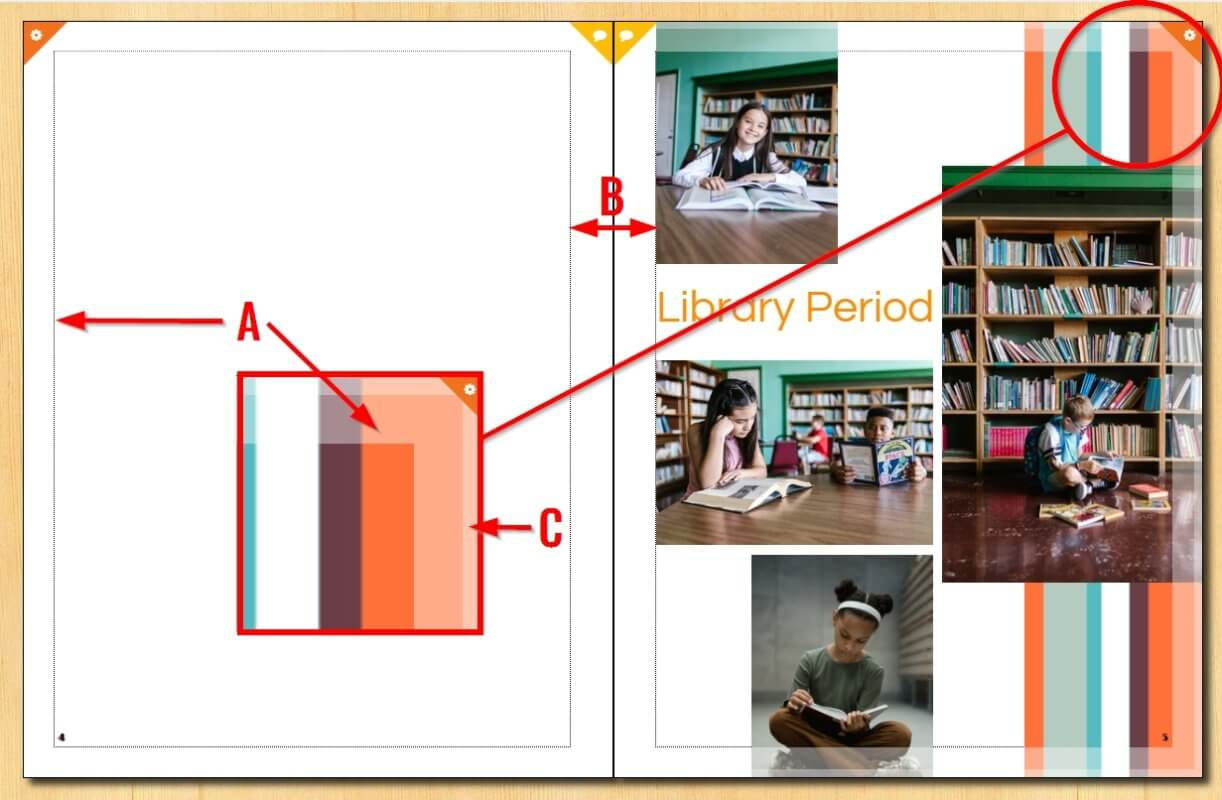
A. Safe Margins – Keep all text and faces within these guidelines. Placing feature elements beyond this area may result in them being clipped or obscured in the middle of the book.
B. Gutter – this is the between facing pages; images and text should not be placed in the gutter area, as they may be obscured inside the fold.
C. Bleed area – A thin margin around your page that will be trimmed off when the book is printed and bound. Backgrounds, large photos, banner and decoration that need to bleed off the edge of the page should completely cover this area.