
Proofing Checklist
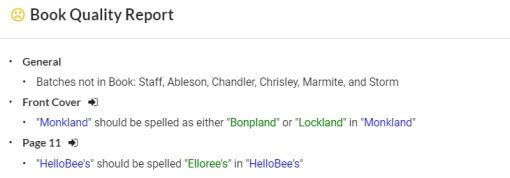
Captura Yearbooks offers a quick quality checker via the editor menu. The report includes spelling mistakes, portrait batches that did not make it into the book, image resolution concerns and other issues.
|
|

For more detailed proofing prior to submission, use the list below to review for common problems.
Watermark & Copyright Issues
Review the entire book including the cover for potential copyright violations. Copyrighted/licensed content needs to be removed unless you have not obtained commercial licenses for the content.
According to copyright law, the following is not permitted without a specific usage license: Watermarked graphics • characters, logos, art from books, movies, tv shows, websites, video games, etc. used in a decorative capacity • original art or photography used without the consent of the content license-holders. This includes celebrity photos, web downloads that are not public domain or commercially distributable by license, works created by independent artists used without their knowledge or consent, content from news outlets. AI-generated graphics depicting trademarked content should not be used -- AI engines data-mine from commercially non-distributable sources, so their productions are not free from copyright rules.
Important: Purchased graphics or design work does not mean that the content is copyright-cleared, free from licensing violations, or the content is good quality. Online graphics vendor (e.g. Etsy, private sites) may offer a package of trademarked character art or logos (eg. Disney, Dr. Seuss, Lego, etc.) intended for home crafting projects. While the copyright rules may allow for one-off personal creations (eg. a birthday invitation or a family scrapbook project), these graphics are not commercially distributable. If you hire a designer, be very clear that all elements used on the cover must be original creations or come from legally obtained commercially-distributable sources.
Fair use: Fan art is allowed. Student art that is a tribute or parody of a licensed property may be used, though it should obviously be a derivation, not an exact copy of the original inspiration. Product logos or promotional materials may be used in an editorial (not decorative) capacity, or in original photography as an incidental inclusion at a public event. For example, if your school hosted a Dr. Seuss-themed event, you may include photos of that event, but not Cat-in-the-Hat clipart. For the most part, cover art will be purely decorative, so avoid all uses of licensed or trademarked content.
Cover Issues
Is the correct school year featured on the cover?
Does the cover feature the school’s name prominently?
Does the cover background and page-wide banners extend to the very outer edges through the trim/wrap area? (No empty white space or thin borders at the page edge)
Is all the text and featured images at a safe distance from the trim edge, respecting the safe margins?
Are feature images and text at least at least 1/4″ from the spine guidelines?
Is there text on the spine?
Is your book set to a hard cover or perfect bound cover that can accommodate spine text or is it a saddle stitch cover that should not have spine text?
Is the spine wide enough to accommodate legible text (eg. 72 pages + is a common limit).
Is the spine text centered within the guidelines? Is it inset from the spine margin lines?
Is the spine color-blocked to the spine guidelines? Be sure to wrap any color at least 1/4″ onto the front & back covers to create a book-binding effect.
Are all images (photos, clipart) on the cover unclipped in their frames? Check for missing edges on clipart or cut-off faces.
Do any photos display a blank, black, or white edge on one or more sides? If so, these may be screenshots with extra blank area around them, which need to be resized to fill in their image frame.
Is the cover background image high resolution? Check for visible pixelation or “noise” spots on low-resolution images.
Are all images (photos, clipart) on the cover high resolution? Check for visible blurriness or pixelation. Note that content created outside of Captura Yearbook (eg. whole covers created in Canva, Adobe products, etc.) will not show resolution issues for images embedded into a flattened jpg image that was saved to 300 dpi. Review your cover art in detail if you have created outside of the yearbook software to check for quality issues.
Page Number Issues
Are all faces and text unobstructed by page numbers?
Are the page numbers generally legible against their backgrounds?
Are all page numbers inside the safe margins?
Portrait Page Issues
Are the portrait pages in the right order?
Are the portrait grids within the safe margins of their pages?
Do the grids include one or more feature frames at the front of their grids (eg. teachers’ portraits are larger)? If so, do only the appropriate staff members appear in featured portrait positions on classroom pages?
Are any student portraits accidentally featured?
Are there any teacher portraits mixed with the student portraits, not at the front of their class?Are the portrait images well-positioned in their frames? Check for portraits with extreme size differences, noticeably off-centered or cropped.
Are individual portraits dramatically out of alignment to the grid? (eg. portraits manually added to the page)
Are any students duplicated on their page? Check the labels for duplicate names – sometimes it is hard to spot the same person twice if they have a different haircut & outfit in two adjacent photos, or the two photos have been split onto separate rows.
Are portraits following alphabetical order by last name, unless they are reordered for priority ranking?
Are portrait labels readable against the page background? Ensure that busy backgrounds or low contrast label-to-background colors do not make individual labels unreadable.
Are there any obvious typos in the labels – such as the same name appearing as both the first and last name, only a single name, or the label featuring placeholder text for missing names?
Are the “No Photo / Missing Photo” lists consistent in styling from page to page, and placed in alignment with the grid?
Are the portrait page titles within the safe margin? Titles should be at least 1/4″ from the page edge.
Do the portrait page titles have the same word order and general styling? (eg. “Mr. Smith’s Grade 5 Class” on one page, “2 – Emerson” on another)
Are there any typos in the portrait page titles?
For example, names ending in s, z or x should never have a possessive ‘s after them, only a ‘, eg. Mrs. Fitz’ Grade 1)
Is there a mismatch between the homeroom teacher’s portrait label and the page title (eg. Mrs. Richardson on the title, Ms Richardson on the label)?
Interior Pages
Are all backgrounds snapped to the page edge?
Are all backgrounds high resolution? Check for visible pixelation or “noise” from low-resolution images. This includes full-page designs created outside of Captura Yearbooks, added to the book as a background.
Are all text and featured images a safe distance from the page edge? Images and text should be inset at minimum 1/4″ from the page edges, including the gutter.
Do images spilling off the page edges keep faces/people within the safe area of the page? Check for faces or people cut off on the page edges.
Are all images high resolution? Check for visible blurriness or pixelation.
Are images of heads/faces clipped in their frames or covered by other photos?
Are there any images used twice in the book?
Do any photos display a blank, black, or white edge on one or more sides? If so, these may be screenshots with extra blank area around them, which need to be resized in their image frame.
Is all text readable against its background? Text on very busy backgrounds or that is not contrasted in color to stand out against the background is very hard to read.
Are there any obvious typos or text formatting issues? Be sure to read the page titles too as these are often overlooked.
Do any text frames display placeholder text (e.g.. “Add text”, “Lorem Ipsum…”, nonsense text)?
Is there any preformatted content in the book, such as senior dedications, advertising, or entire pages created outside of the software?
Is this content placed respectful of the safe margins – with 1/4″ + margins to keep images and text away from the trim edge of the page?
Is this content positioned within its image frame so it is not clipped by the frame edges?
Is this content high resolution, with clear crisp text and unpixelated sharp images?