Archiving a Job in Captura Workflow
Learn what it means to archive a job, when jobs are archived automatically, and how to archive multiple jobs at once.
What happens when you archive a job?
Archiving a job removes it from active use and locks it to prevent future changes. Once a job is archived:
The gallery is taken offline.
New orders can no longer be placed.
The job is locked to prevent additional edits.
This helps keep completed jobs organized while protecting them from accidental changes.
When is a job archived automatically?
To help keep your job list organized, Captura Workflow automatically archives a job when both of the following are true:
The gallery hasn't been viewed for 18 months.
No orders have been placed for 18 months.
Any time someone views the gallery or places an order, the 18-month timer starts over.
Don't worry—if you need to access the job again, you can remove the archived status at any time.
Can I archive multiple jobs at once?
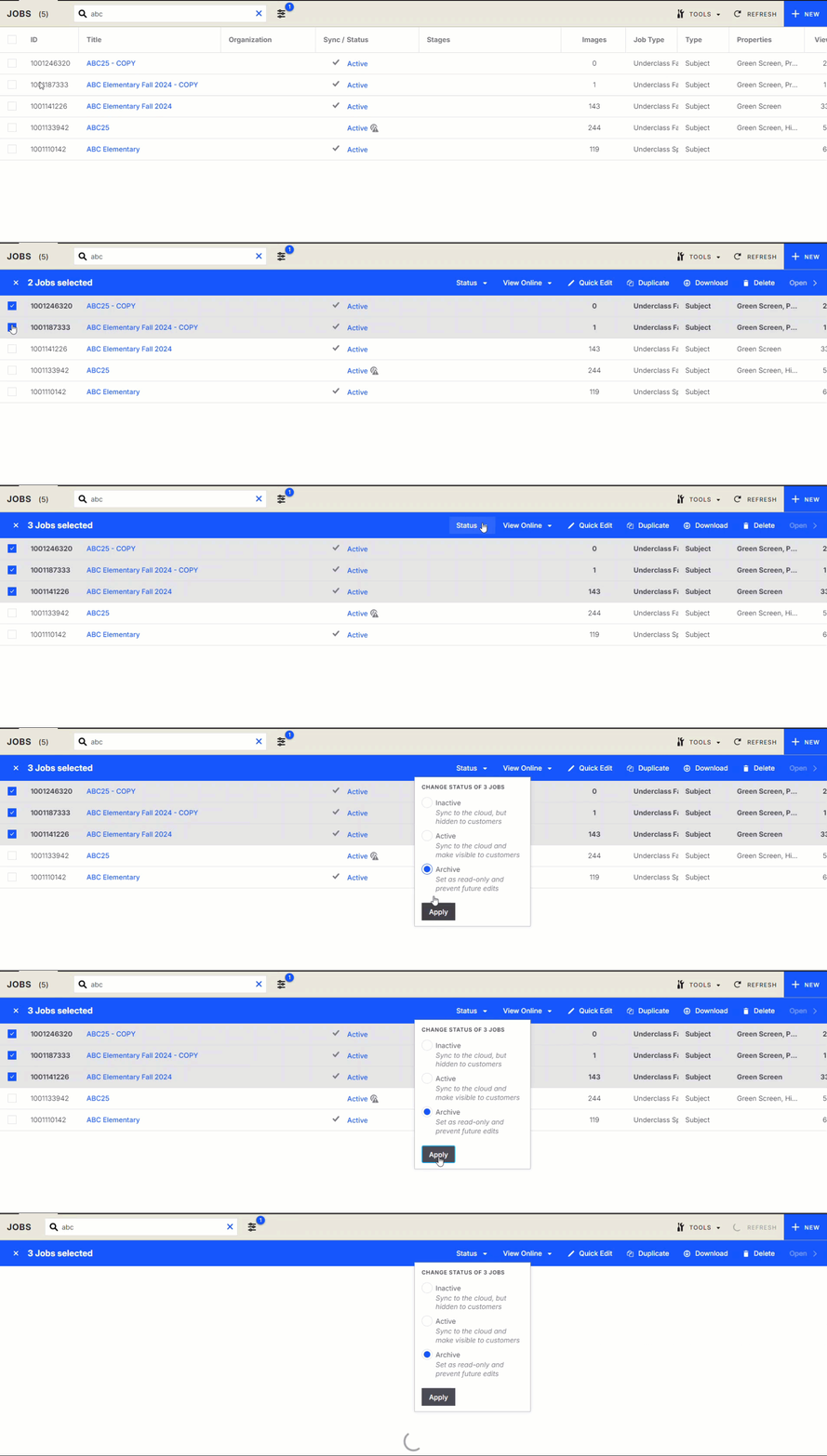
Yes. You can archive several jobs in just a few clicks.
Go to Jobs.
Select the jobs you want to archive.
Click Status > Archive.
Archiving multiple jobs at once makes it easy to keep your workspace organized, especially after a busy season.